KernelEx is already well known for being able to get newer programs running on Windows 9x. On this page, I want to show off more unorthodox things it can do.
All tricks here work on non-SSE2 processors unless specified otherwise.
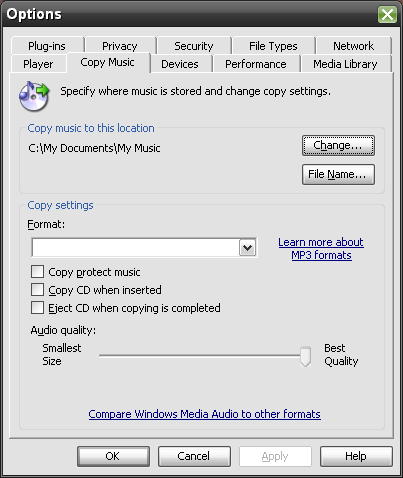
This tricks relates to Windows Media Player 9, so you'll need it installed to do this.
If you then re-open settings, you'll notice there is seemingly no format selected (see picture). If you rip a CD however, it will be in WMA Lossless.
Don't want to use Windows Media Audio? Encode your library in the superior AAC instead with qaac and the help of KernelEx.
NOTE: To play back AAC, install CCCP for Windows Media Player or use QuickTime 6.5.2.
You should be able to encode wave files with qaac now. For example, to encode in 'iTunes Plus' format:
qaac --no-smart-padding -v256 -q2 file.wav -o file.m4a
* these files might not be from iTunes
In addition to KernelEx you will need to install DirectX 9.0c November 2008.
This involves copying several DirectX files (depending on the game).
You should be able to get up until Touhou 16 working.